
Digital Signatures

Sign Documents Digitally
Stonehouse Wealth Management uses Annature, one of Australia’s leading eSignature and Client verification provider.
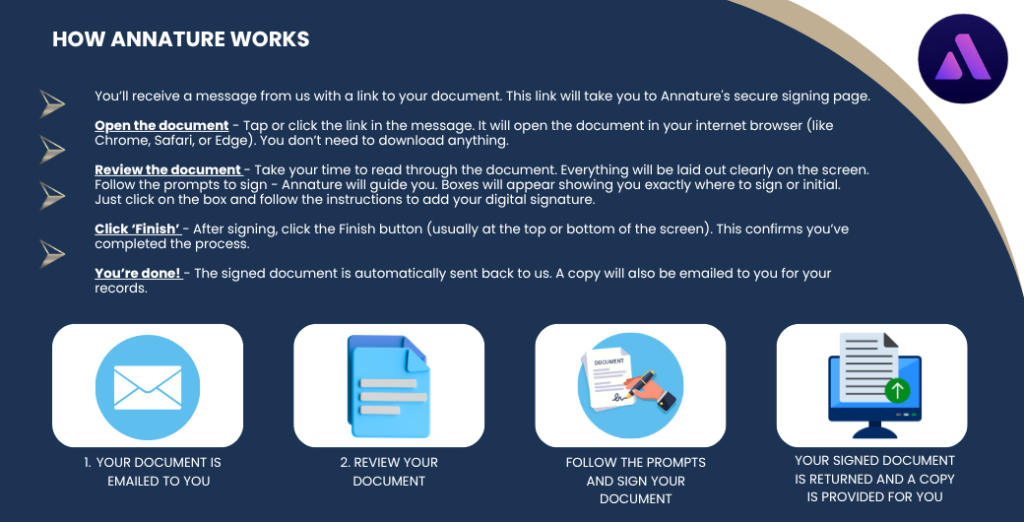
Annature is a secure and easy way to sign documents online. Instead of printing, scanning, or posting paperwork, you’ll receive a link by email or SMS. Just click the link, review the document, and sign it from your phone or computer. It’s fast, safe, and legally accepted—no special apps or accounts needed.
Is Annature safe and secure?
Annature is a trusted Australian provider of digital signature solutions, built with bank-grade security and used by professionals across various industries. It is fully compliant with Australian privacy laws and digital signature standards, ensuring your personal information and documents are protected at all times.
Clients will only be able to access their documents through a personalised email or SMS sent directly by Annature. These messages contain a unique and secure link, which cannot be used or accessed by anyone else. Once the document has been signed, a copy is sent directly to your nominated email address.
Executed documents are only stored temporarily within the Annature platform. After this short period, they are securely purged from Annature’s system and retained only within our internal systems in accordance with our firm’s document storage and privacy policies.
Are digital signatures legally binding?
Yes. Digital signatures through Annature are legally binding and carry the same weight as handwritten signatures under Australian law. When you sign a document electronically, it is valid and enforceable in the same way as if you had signed it in person. Each digital signature is also accompanied by a full audit trail, confirming when and by whom the document was signed.
Can I use my phone to sign the document?
Yes! Annature works on all devices — including smartphones, tablets, and computers. The signing process is fully mobile-friendly, so you can complete it wherever is most convenient for you.
How long do I have to sign the document?
The secure link we send you will remain active for a limited time (typically 14 days). We recommend reviewing and signing the document as soon as you’re able. If the link expires or you need a new one, just let us know — we’re happy to resend it.
What if I notice a mistake or need something changed before I sign?
Please don’t sign the document if something looks incorrect. Instead, contact us directly and we’ll make any necessary changes before sending you a revised version to sign.
What happens after I sign?
Once you complete your signature, the document is securely returned to us. You’ll automatically receive a copy via email for your own records — there’s nothing more you need to do.